

Every week someone puts a phone on our counter, opens Settings, points at a number and asks the same question: "It says 81% — do I need a new battery?" And every week we give the same annoying answer: maybe, but that number isn't what tells us.
Battery health is the most-checked and least-understood screen on an iPhone. People replace batteries that had a year left in them, and people limp along for months with a phone that dies on the tram because "the percentage still looks alright." So here's the honest version, from the bench that does about a dozen of these a week.
What that percentage actually is
Open Settings → Battery → Battery Health & Charging and you get Maximum Capacity — how much charge your battery holds now compared to the day it left the factory. Two things about it that surprise people.
First, it's an estimate, not a measurement. Your iPhone doesn't have a lab rig inside it. iOS works the figure out by watching how your battery charges, discharges and holds voltage over time. That's why it can sit stubbornly on 89% for six months and then drop three points in a fortnight. The battery didn't fall off a cliff — the estimate caught up.
Second, 80% is a warranty line, not a failure line. Apple designs iPhone batteries to keep 80% of their original capacity for a set number of full charge cycles: 500 for iPhone 14 and earlier, and 1,000 for iPhone 15 and later. Below that line, Apple stops calling the battery healthy. That's all it means. It is not the phone telling you it's broken.
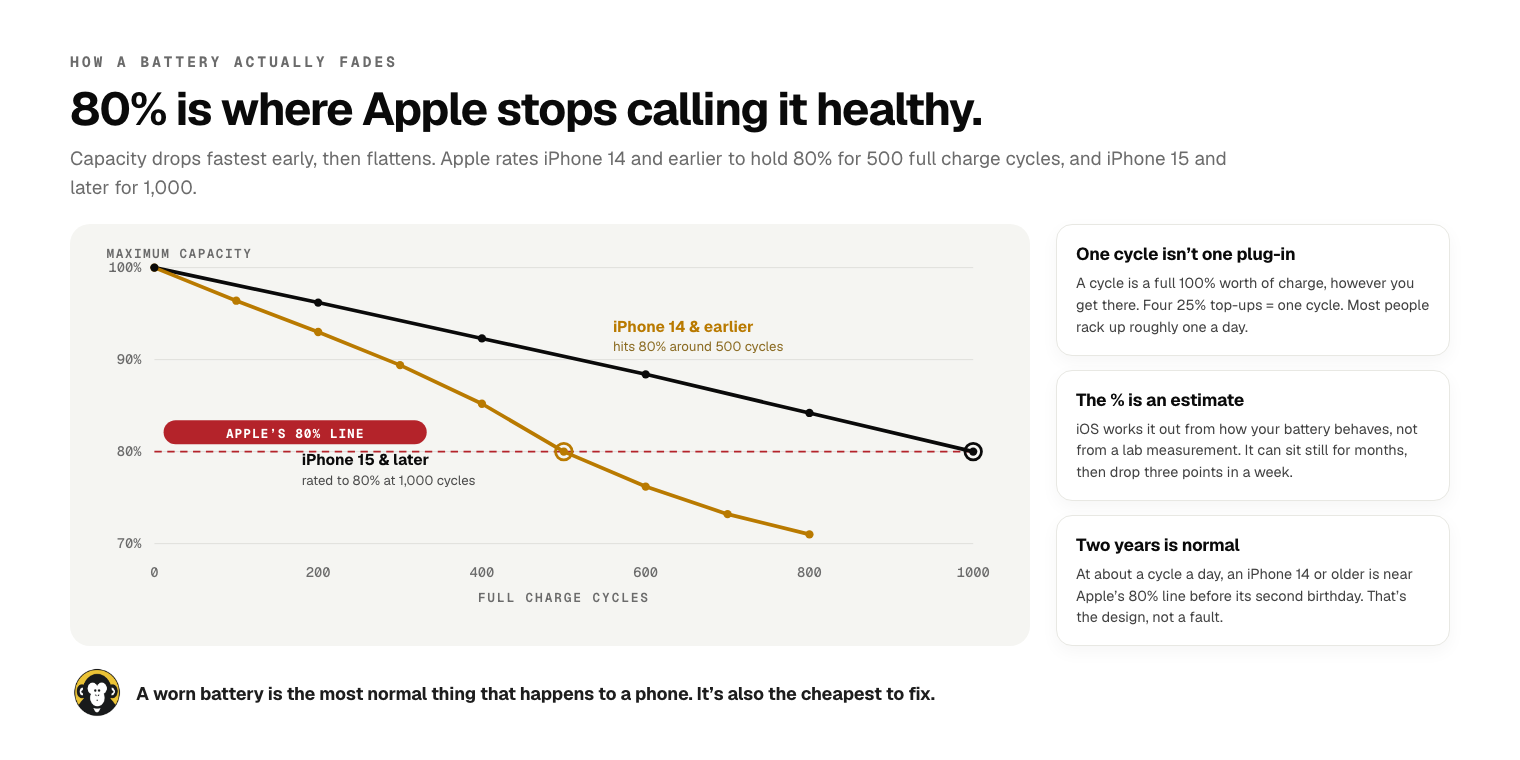
The cycle thing catches people out too. One cycle isn't one plug-in — it's a full 100% worth of charge, however you get there. Four 25% top-ups through the day is one cycle. Most people churn through roughly one a day, which means an iPhone 13 or 14 is knocking on Apple's 80% line somewhere around its second birthday. That's the design working as intended, not a defect.
(If you've got an iPhone 15 or newer, you can see the actual number: Settings → General → About → Cycle Count. Older iPhones don't show it, which is why the percentage gets all the attention.)
So when does 80% actually mean replace?
When the phone starts behaving like it. We don't triage batteries by percentage at the counter — we triage them by symptoms, because a battery at 78% that still gets you to bedtime is doing its job, and a battery at 86% that shuts the phone off outside Woolies is not.
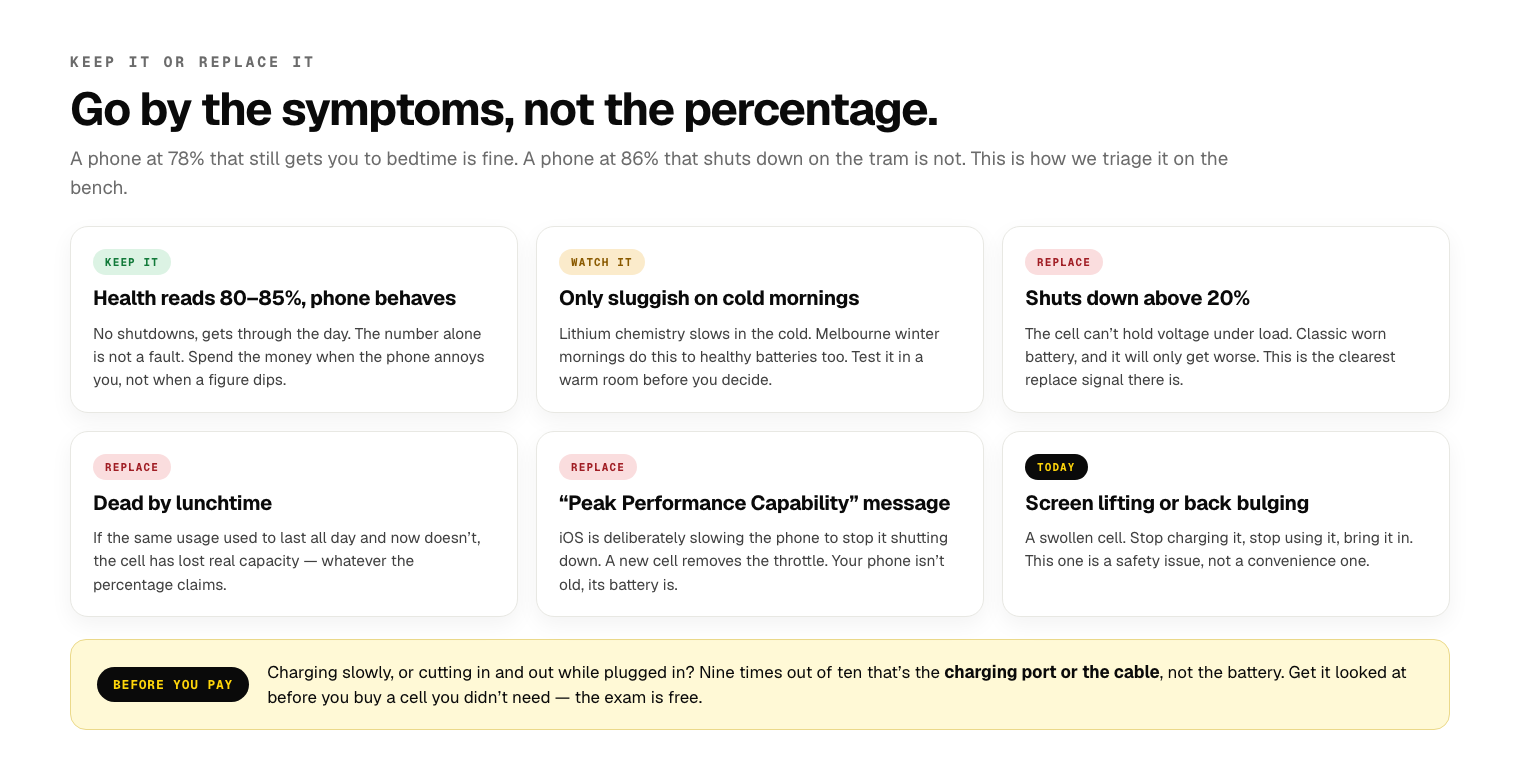
The one that settles it fastest is the sudden shutdown. If your phone dies at 30%, or 40%, and then reboots showing charge left, that's a worn cell that can't hold its voltage when the phone asks for power. It doesn't improve. It gets worse in the cold, worse under load, and worse every month. That's a replace, whatever the percentage says.
Close behind it is the "Peak Performance Capability" message. If you've seen that on the Battery Health screen, iOS has already caught your phone shutting down unexpectedly and is now deliberately slowing it down to stop it happening again. This is the famous "Apple slows down old iPhones" thing, and it's real — but it's not about the age of your phone, it's about the state of your battery. Put a new cell in and the throttle lifts. We've handed back plenty of "slow old phones" that were just phones with tired batteries.
Nobody has ever come back and told us their phone feels faster because of a number on a screen. They come back because it stopped dying at lunchtime.
And one that isn't a maybe: if your screen is lifting away from the frame, or the back has started to bulge, stop. That's a swollen battery. Don't charge it, don't leave it in the car, don't "get to it next week." Swollen cells push screens off phones and they don't get better on their own. Bring it in that day — it's a straightforward job when it's caught early and a much bigger one when the screen has already been levered apart.
The winter asterisk
It's August, so this one's earning its keep right now. Every winter we get a run of people convinced their battery has died overnight, when what's actually happened is a 4°C morning in Bundoora.
Lithium cells slow down in the cold. The chemistry genuinely can't move charge as fast, so the phone reads a lower voltage, panics, and either drops percentage fast or shuts off entirely — then miraculously recovers once it's back in a warm pocket. Apple rates iPhones for ambient temperatures between 0°C and 35°C, and a Melbourne winter morning sits right at the bottom of that.
Here's the honest bit: cold makes a healthy battery look bad, and it makes an already worn battery look catastrophic. So before you spend money in July or August, test it properly — use the phone for a day indoors, at room temperature, and see whether the problem follows you. If it's only bad on the way to the station, that's the weather. If it's dying at your desk at 2pm, that's the battery.
What actually kills a battery
Most of the battery advice floating around is decades out of date — it's leftover wisdom from nickel batteries that stopped being made before the iPhone existed. Here's what we actually see wreck cells, and what we've stopped worrying about.
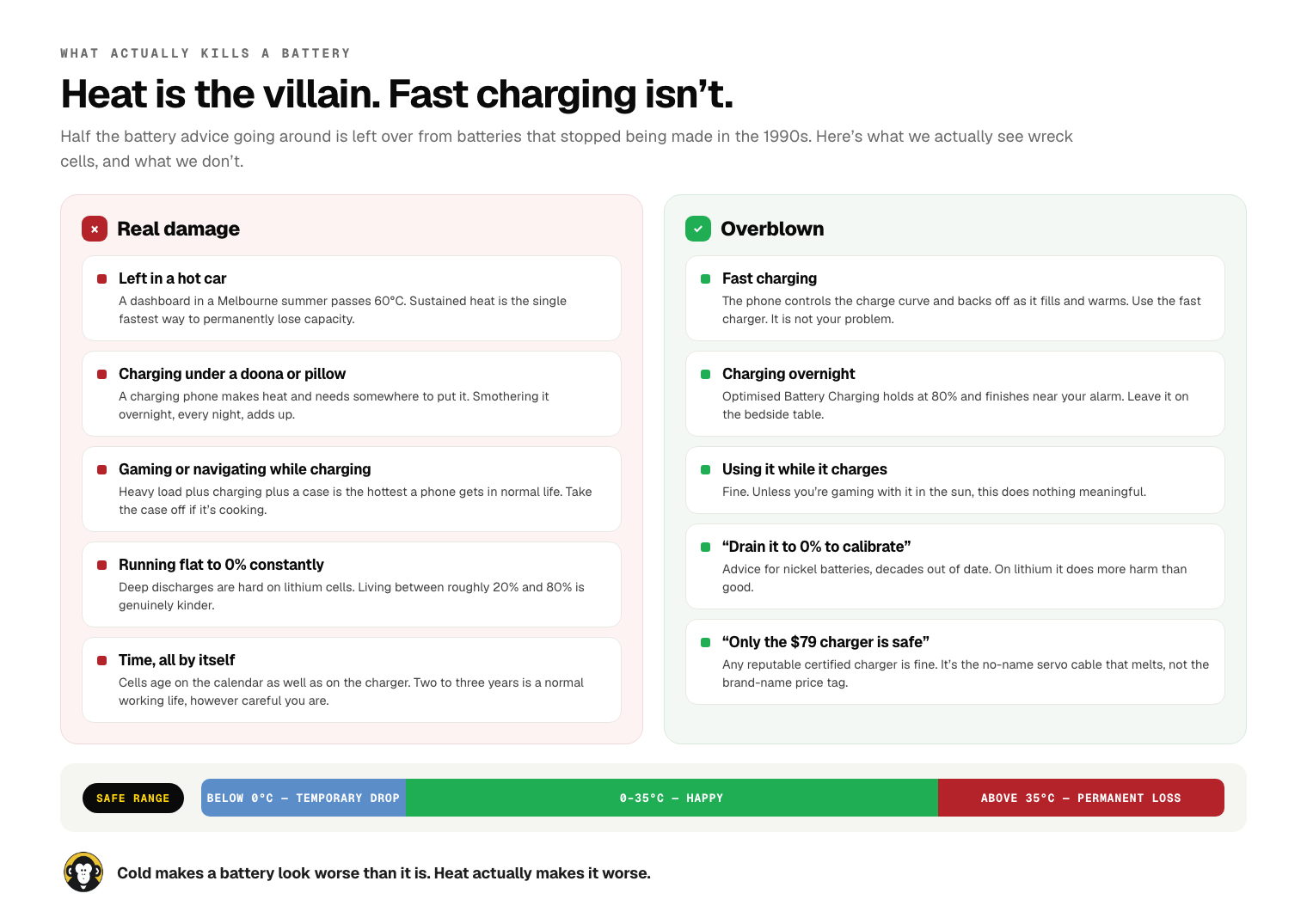
Heat is the villain, and it's not close. A dashboard in a Melbourne February goes well past 60°C, and sustained heat permanently costs a battery capacity in a way nothing else does. The everyday version isn't a parked car though — it's charging under a doona every single night, or navigating with the phone in a windscreen mount in the sun, or gaming while it's plugged in with a thick case on. If your phone feels hot to hold, take the case off and let it breathe.
Fast charging is fine. We get asked this constantly. The phone controls the charge curve, not the charger — it pulls hard when it's empty and cool, and eases right off as it fills up and warms. Overnight charging is fine too; Optimised Battery Charging deliberately parks at 80% and finishes just before your alarm. Using the phone while it charges is fine. And you don't need to run it flat to "calibrate" anything — on lithium that does more harm than good.
The only genuinely useful habits: keep it out of the heat, and if it's easy, live between roughly 20% and 80% rather than bouncing off 0% every day. Beyond that, batteries wear out because time passes. Two to three years of real use is a normal working life for a phone battery, and no amount of careful charging changes that much.
What it costs, and what actually happens
An iPhone battery replacement starts at $55 for the older models, and most current iPhones land between $99 and $130. It's about a 30-minute job — you can walk in, get a coffee at DFO and it'll be done. We fit quality Greencell aftermarket cells as standard, which is what about nine out of ten customers go with, and we'll order in a genuine Apple service pack battery instead if you'd rather. Ask and we'll tell you the difference straight.
Every repair carries a minimum 90-day warranty on parts and labour. And we look before we quote — the exam is free. That matters more on batteries than most jobs, because a fair number of "battery problems" aren't. If your phone charges slowly, cuts in and out when you wiggle the cable, or only charges at certain angles, that's usually a lint-packed or worn charging port, not the battery — and we'd rather clean a port for you than sell you a cell you didn't need.
The other thing worth saying out loud: on an older phone, a battery is the single cheapest way to make it feel new again. A four-year-old iPhone with a fresh cell will comfortably do another couple of years for the price of a decent dinner. We'll tell you when it's not worth it too — if the screen's cracked, the port's shot and the battery's flat on a seven-year-old handset, we'll say so rather than take three payments off you.
The short version
Stop staring at the percentage. If your phone gets through your day, it's fine, whatever the number reads. If it shuts down early, dies by lunchtime, or iOS is throttling it, replace the battery — you'll get a phone that feels years younger for about a hundred bucks. If it's swollen, come in today. And if it's only misbehaving on a freezing morning, give it a fair test indoors before you spend anything.
Not sure which one you've got? Build a quote in 60 seconds, or just bring the phone in — we'll put it on the bench, tell you what we find, and you can decide from there. Full list of what we fix is on the repairs page.
03 9467 9694 · K10, DFO Uni Hill, 2 Janefield Drive, Bundoora · open every day, 10:00am – 6:00pm


Be the first to comment — or if you'd rather just ask us in person, walk in to DFO Uni Hill any day 10–6.