

Here's the thing nobody tells you when your phone stops charging: most of the time, the port isn't broken. It's full.
We've been on the bench at DFO Uni Hill since 2013, and charging ports are the single most-misdiagnosed fault that walks through our door. Someone comes in convinced they need a new port — they've been wiggling the cable for a fortnight, propping the phone at an angle so it'll charge overnight, buying a third cable because "the cable must be dodgy." We put the phone under the microscope and there it is: a compacted grey plug of pocket lint sitting at the back of the port, packed hard as felt by two years of cable insertions.
Around 95% of "my charging port is dead" jobs we see are exactly that. The port works fine. The pins just can't reach it.
So this is the honest version of what happens with charging ports — how to check yours before you pay anyone a cent, how to tell dirty from actually dead, why we won't fit a generic charging flex, and what it costs when the port genuinely does need replacing.
The fix that works most of the time — and how to try it yourself first
A modern charging port is a slot about 2.5mm tall with a plastic tongue in the middle carrying the contact pins. Every time you push a cable in, you push whatever's in your pocket in with it. Lint, jumper fluff, sand from the Mornington Peninsula, the fine grey dust that lives in every tradie's ute. It doesn't blow back out. Each insertion compresses it a little more against the back wall.
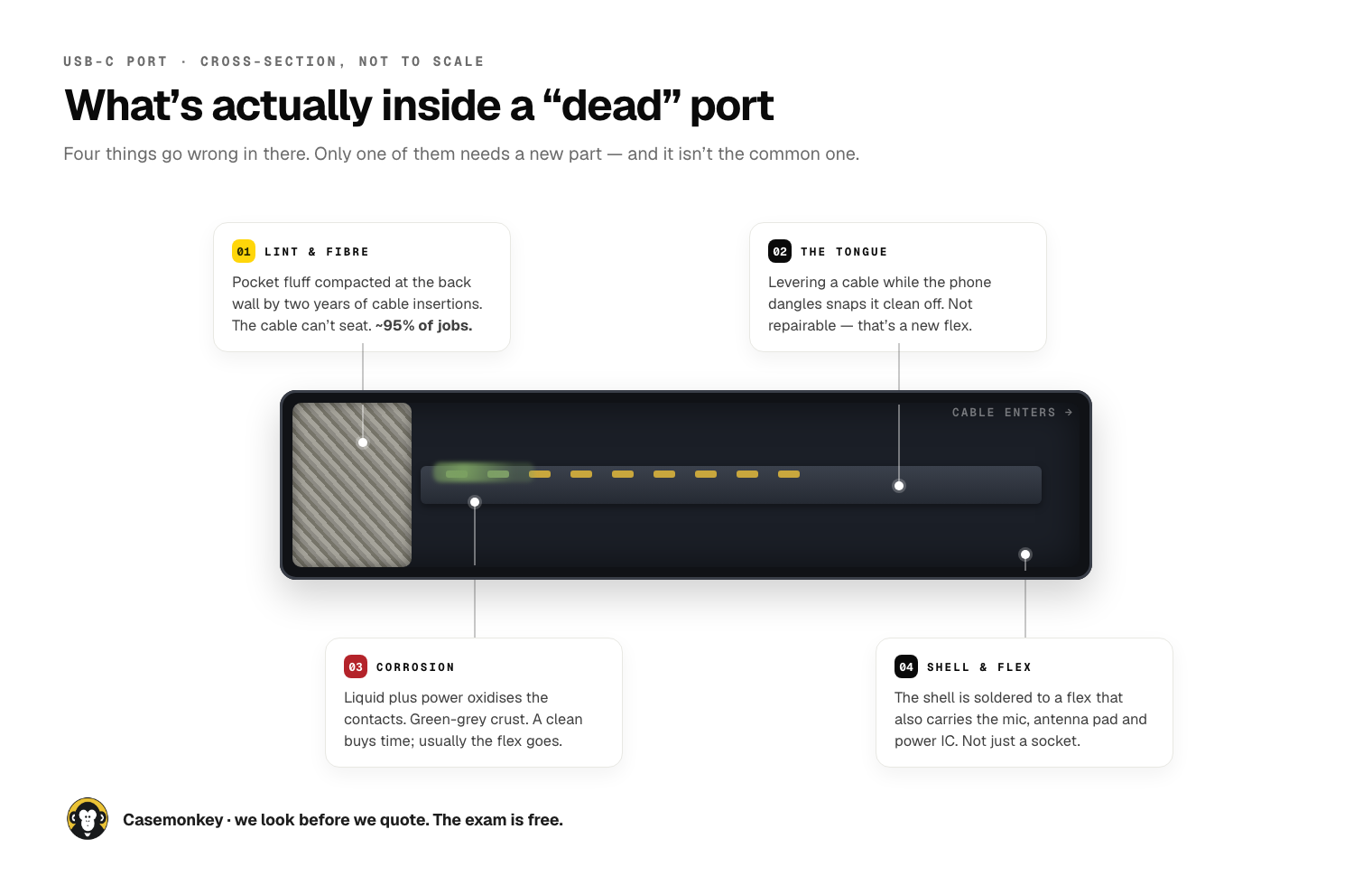
After eighteen months to two years of that, you've got a felt pad in there. The cable physically cannot seat all the way. You get the classic symptoms:
- It charges only at a certain angle, or only if you press the cable in hard
- It charges, then stops, then starts again if you jiggle it
- It charges from one cable but not another (the plugs have slightly different tolerances)
- It charges slowly, or the phone says "accessory not supported"
- Wireless charging works perfectly but the cable does nothing
If any of those describe your phone, try this before you pay anyone:
Turn the phone off. Not asleep — properly off. Get a wooden or plastic toothpick. Not a paperclip, not a SIM ejector tool, not a pin — metal against the contact pins is how a $25 clean becomes a $130 replacement. Angle the toothpick along the top or bottom wall of the port, not down the middle. The tongue in the centre is fragile; the walls aren't. Scrape gently outward. Do it under a bright light so you can see what you're pulling out.
Nine times out of ten a genuinely blocked port gives up a surprising amount of grey fluff. Plug the cable in afterwards and if it clicks in noticeably deeper than it has for months, that was your problem.
Two things not to do. Don't use compressed air — canned air pushes lint deeper and the propellant can leave residue on the contacts. And don't use isopropyl or any liquid unless you know what you're doing; on a live board it's a genuine short risk.
If the toothpick doesn't fix it, that's when it's worth bringing in. We'll examine the port under 40× magnification for free — about ten minutes, no charge, no obligation. If it's dirty, an ultrasonic clean is $25 and takes about twenty minutes on the bench. About 85% of the port jobs that come to us end right there: cleaned, charging, out the door for twenty-five bucks. We'd rather you spend $25 than $130, and we'd rather tell you the truth than sell you a part you don't need.
The same clean also fixes the two faults people never connect to it: a muffled earpiece and a quiet loudspeaker. Same lint, same grilles, same ultrasonic bath. If your calls have got quiet over the last year, mention it — it's included.
How to tell whether the port is actually dead
Sometimes it really is the port. Here's how we tell the difference, and how you can make a decent guess at home.
Look at it. Torch, magnifier, phone camera on macro if you've got a newer model. A dirty port looks full — you'll see grey or beige fibre packed at the back. A dead port looks damaged: the tongue snapped off or sitting crooked, or green-grey crust on the pins.
The angle test. If it charges at one specific angle and nothing else, that's usually mechanical — either lint on one side or a bent tongue. If it charges in no position at all, ever, with three different cables, the port or the flex is more likely gone.
The heat test. If the phone or the cable head gets hot while plugged in and still doesn't charge, stop. That's a short or corrosion drawing current where it shouldn't. Unplug it and bring it in — don't leave it charging overnight to "see if it fixes itself."
The green crust. Corrosion is the one you can't clean your way out of. If the phone got wet at any point in the last few months — pool, beach, spilled drink, a wet pocket in a Melbourne downpour — and the port now looks slightly green or chalky, the contacts are oxidising. A clean sometimes buys time. Usually the flex needs to go. And if there's been liquid in the phone at all, the port is the least of it: our water-damage assessment is a flat $65 and it's the right call, because corrosion doesn't stop at the port.
The snapped tongue. Charging on the couch with the phone hanging off the cable, or leaving it plugged in on a bed and rolling on it, levers the cable against that little plastic tongue like a crowbar. One day it snaps clean off. That's not repairable — it's a new flex, no debate. You'll usually see it: the middle of the port looks hollow, or the plug goes in far too easily and just spins.
One more: if the phone charges wirelessly but not by cable, that's a very strong signal the fault is the port or the flex, not the battery or the board. Useful to know before anyone quotes you on a battery.
Why we fit the manufacturer's own flex, every time
When we do replace a port, we only fit the original part. Not "OEM-equivalent," not a generic. On a charging port specifically we don't offer an aftermarket option at all — and there's a reason it's the one repair where we won't budge.
On most phones the charging port isn't a standalone component. It sits on a flex cable that also carries the bottom microphone, an antenna contact pad, the power management IC and a handful of tiny capacitors. You're not replacing a socket. You're replacing a small circuit board that half a dozen unrelated features depend on.
Generic flexes look identical and use cheaper versions of all of that. So the port works — and three weeks later the customer's back with problems that seem completely unrelated to the repair:
- People say you sound distant or crackly on calls (cheap bottom mic)
- Mobile signal drops a bar or two in the same places it never used to (antenna pad tolerance)
- Charging is suddenly slower than it was, especially on fast chargers (undersized power IC)
- "Accessory may not be supported" warnings that come and go
None of those get connected back to the $60 port repair from a month ago. That's exactly why cheap flexes stay in the market — the failures are deniable. We're not interested in a repair we have to argue about, so we don't fit them.
There's a second trap that's Samsung-specific, and it's the single most common avoidable failure on Android port repairs.
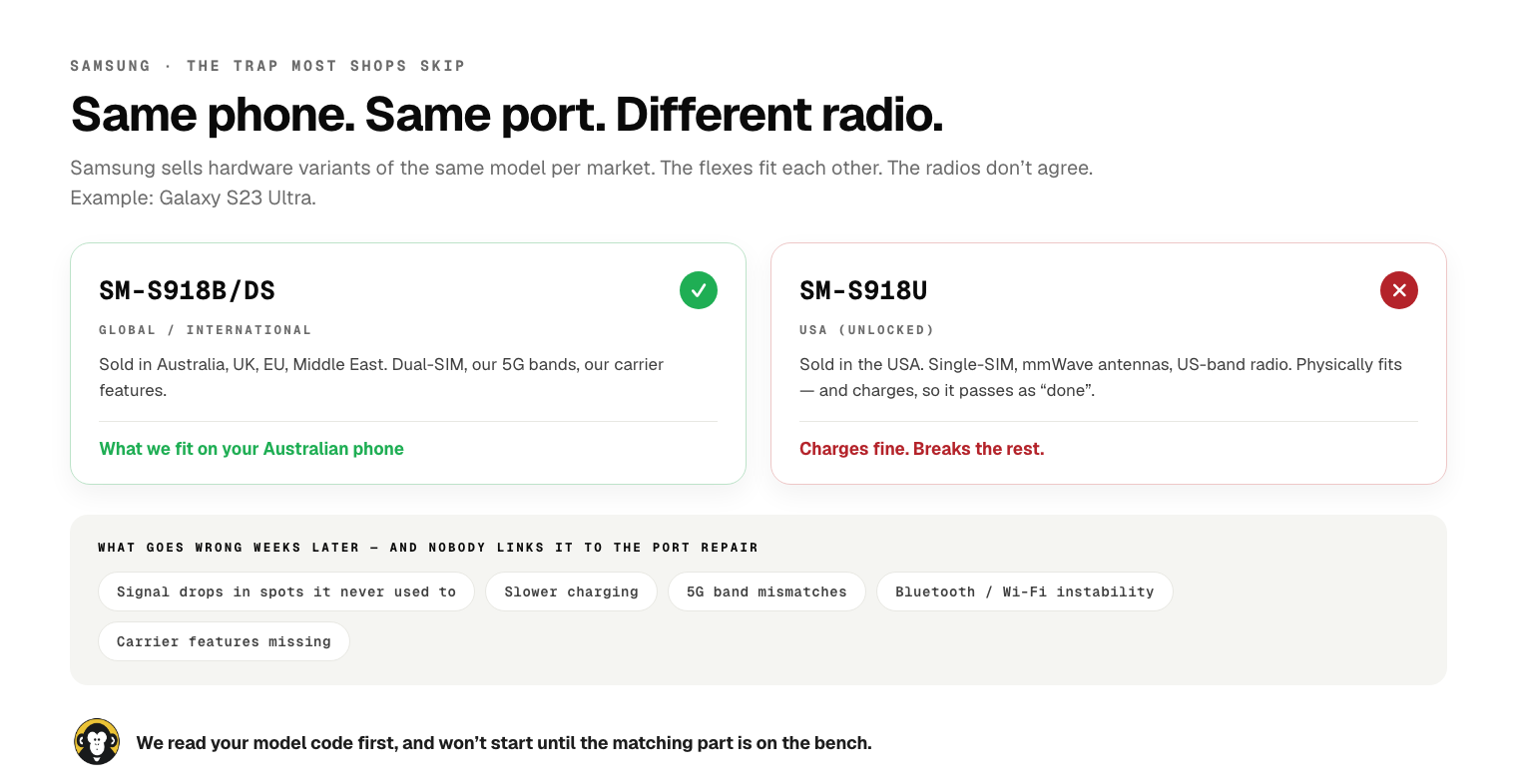
Samsung sells hardware variants of the same phone in different markets, and the charging flex is one of the parts that differs. A Galaxy S23 Ultra sold in Australia is an SM-S918B/DS — global variant, dual-SIM, our band layout. The US model is an SM-S918U — single-SIM, mmWave antennas, different radio bands. The flexes physically fit each other. The radios don't agree.
Fit a US flex to an Australian Galaxy and the phone will charge, so the shop hands it back as a completed job. Then over the following weeks: signal dropping in spots it never used to, slower charging, 5G bands the phone won't hold, occasional Bluetooth and Wi-Fi instability. Nobody links it to the port repair.
So the first thing we do on any Samsung port job is read the SM- code off the phone (Settings → About phone → Model number) and source the matching variant. If the right part isn't on the bench, we don't start the job. It costs us a day sometimes. It saves the customer a fault they'd never be able to diagnose.
While we're here: we also don't do "tip repair" on flagships if we can avoid it. Tip repair means desoldering the broken USB-C shell and soldering a new one onto the existing pads. It's faster and cheaper, and we can't make that bond as strong as the factory weld — once those pads have been reworked, they're weaker forever, and you'll be back. We only offer it where a full replacement flex genuinely isn't available or isn't economical: older budget phones, niche brands, hard-to-source models. And we'll say so upfront.
USB-C vs Lightning — what our bench actually shows
Everyone assumed USB-C would be tougher because it's reversible and feels more substantial. Thirteen years in, our queue says something more nuanced.
Lightning ports clog worse. The Lightning slot is shallower and wider, and the tongue design gives lint more ledge to pack against. The old iPhone 7/8/SE-era phones we still see are almost comically full when they come in. But Lightning tongues are more robust against levering — they bend before they snap.
USB-C ports clog less but break harder. The deeper slot means less of what goes in gets trapped at the contact face. But that centre tongue is thinner and it's the failure point when someone levers a cable. When a USB-C port fails on our bench, it's more often mechanical damage than dirt. Lightning failures are more often dirt.
The real variable isn't the connector — it's the cable and the charger. Wrong-spec cables and no-brand 65W chargers pit the contacts over time; you get intermittent charging that people blame on the port. A proper USB-C PD cable or an MFi-certified Lightning cable with a known-brand charger will comfortably outlive the phone. It's the least glamorous advice we give and it's the one that actually saves people money.
And the habit that costs Melbourne more ports than anything else: charging while the phone dangles off the edge of a couch or bed. That's the crowbar. Charge it flat on a surface and most of this article stops applying to you.
What it costs, and how long it takes
Straight numbers, no asterisks.

Free to look. Microscope exam, about ten minutes, no obligation. That's the same free diagnosis we run on everything except liquid damage, which is a flat $65 assessment because it's genuinely a different job.
$25 for an ultrasonic clean if that's what it needs — port, earpiece and loudspeaker grilles, microphone ports, all of it. About twenty minutes. Roughly 85% of port jobs end here.
$65–$160 for a full original-part replacement, depending on model. Older iPhones (6 through 8, SE) sit at the bottom of that; most Samsung Galaxy models are $85; current-generation iPhone Pro models are at the top. About 45 minutes on the bench, same day in almost every case. The full per-model rate card is public on our pricing page — no "from" pricing, no counter surprise.
If the clean doesn't fix it, the clean is free and we quote you the replacement. No-fix-no-fee applies: if we can't fix it, you don't pay. Every replacement carries our minimum 90-day warranty on parts and labour.
That's the whole thing. Try the toothpick first — genuinely, we'd rather you did. If that doesn't do it, walk into K10 at DFO Uni Hill any day between 10 and 6 and we'll look at it for free, or build a quote in 60 seconds before you leave the house. More detail on the process is on our charging port repair page, and the wider phone repair rundown covers everything else that walks in with it.
If you want the same honest treatment on screens, our guide to what an iPhone screen replacement actually involves is the companion piece to this one.
03 9467 9694 · K10, DFO Uni Hill, 2 Janefield Drive, Bundoora · open every day, 10:00am – 6:00pm


Be the first to comment — or if you'd rather just ask us in person, walk in to DFO Uni Hill any day 10–6.