

There's a moment every MacBook owner hits eventually. The battery's dying by lunchtime, or the screen's cracked, or the keyboard's dropping letters, and you're standing at the counter looking at a repair quote north of $500 wondering if you'd be an idiot to spend it on a machine this old.
We see that face a few times a week. And here's the thing most repair shops won't tell you: sometimes the honest answer is don't fix it. We've been on the bench at DFO Uni Hill for 13 years, and we'd rather tell you to walk away than take $700 off you to breathe six months of life into a laptop that's already on the way out.
So instead of a sales pitch, here's the actual framework we use — three questions we'll walk through with you at the counter. Answer them honestly and the decision usually makes itself.
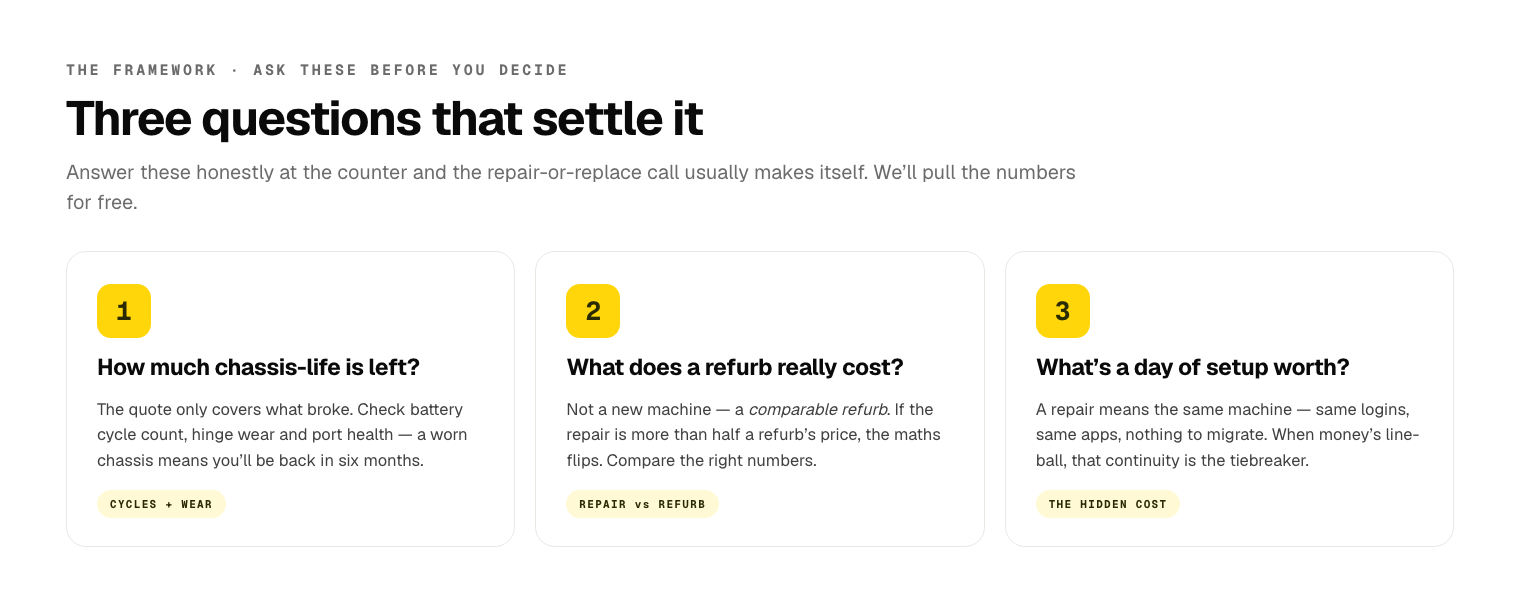
Question one: how much chassis-life is actually left?
The repair quote is only for the thing that's broken. What matters is everything that isn't broken yet — because a MacBook is a bundle of parts that age together, and fixing one doesn't reset the clock on the rest.
When we assess an older MacBook, we're looking at four things beyond whatever you brought it in for:
- Battery cycle count. Every MacBook logs its charge cycles, and you can see yours right now: hold Option, click the Apple menu, choose System Information, then Power. Apple rates most modern MacBook batteries for around 1,000 cycles before they're considered worn. If you're at 300, the battery's got years left. If you're at 950 and your screen is the thing that broke, you're about to pay for a screen and then pay for a battery six months later.
- Hinge and lid wear. The clutch mechanism that holds your screen at an angle wears out. If the lid flops or won't hold position, that's a chassis problem, not a quick fix — and it's a strong signal the machine has had a hard life.
- Port and connector health. Wobbly USB-C ports, a charge port that only works at one angle, a dead speaker — these are the small failures that cluster near the end of a laptop's life. One of them alone is nothing. Three of them together is the machine telling you something.
- The logic board itself. This is the expensive one. If the fault you came in with is board-level (won't power on, no charge, random shutdowns) rather than a simple part swap, the economics change completely. A screen or battery is a known cost. Board-level repair is a bigger commitment on an old machine.
The rule of thumb we use: if the repair cost is more than about half what the machine is worth working, and the rest of the chassis is worn, that's a machine near the end of the road. If the repair is a clean part swap (battery, screen, keyboard) and everything else checks out, you've likely got years of runway and the repair is a no-brainer.
Bring it in and we'll pull the numbers for free — cycle count, an honest look at the hinge and ports, and whether the fault is a simple swap or something deeper. No obligation, no charge to look. That's how we run every laptop repair assessment.
Question two: what does a comparable refurb actually cost today?
This is the question people skip, and it's the one that changes the maths most.
You're not really choosing between "repair" and "buy a brand-new MacBook." You're choosing between repairing what you've got and buying a comparable refurbished machine — because a refurb that matches your current laptop's performance is a fraction of the new price, and for most people it's the honest alternative.
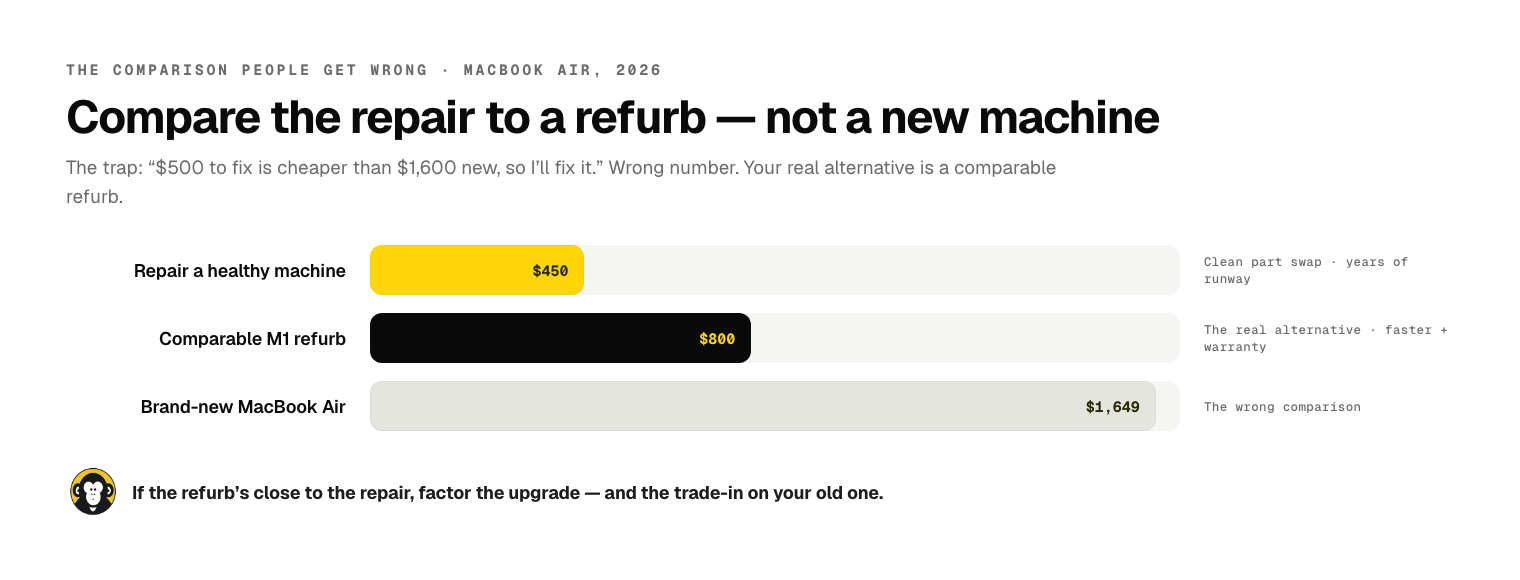
Here's roughly where the Australian refurb market sits in mid-2026 for the machines we see most:
- A refurbished 2018–2019 MacBook Air or Pro (the kind of machine most repair-or-replace decisions are about) runs somewhere in the $450–$750 range depending on spec and condition.
- A refurbished M1 MacBook Air — a genuinely fast, current-feeling machine — sits around $700–$950 and will feel like a serious upgrade over anything from the Intel era.
- A brand-new entry MacBook Air is well over $1,600.
So the real comparison is usually this: your repair quote versus a $600–$900 refurb. If the repair is $250 and the machine has life in it, repair wins easily — you're spending a third of the refurb price to keep a machine you already know. If the repair is $650 on a worn-out 2017 chassis, and $750 buys you a far faster M1 with a fresh battery and a warranty, the refurb is the smarter money.
The trap is comparing your repair to a $1,600 new machine and concluding "well, $650 to fix is cheaper than new, so I'll fix it." That's the wrong comparison. Compare it to the refurb.
And if you land on "replace," we'll give you a fair number for the old machine on trade-in — even a laptop with a cracked screen has value for parts, and that offsets the refurb. You don't just bin it.
Question three: the underrated value of not setting up a new machine
This is the one nobody puts a dollar figure on, and it's often the deciding factor.
Migrating to a new machine is not free, even when the migration "works." Think about what actually lives on your current MacBook:
- The apps you've installed and forgotten you installed, until you need one.
- The logins saved in your browser, the two-factor apps, the Wi-Fi passwords.
- That one piece of software with a licence key you can't find anymore.
- The exact folder structure and workflow muscle memory you've built over years.
- The stuff that was never backed up to iCloud because it lived in some app's local storage.
Apple's Migration Assistant handles a lot of this, and when it works it's great. But "a lot" isn't "all," and every person who's done a migration knows the tail end — the afternoon of re-logging-in, re-authorising, re-finding, and discovering the one thing that didn't come across. For a lot of people, especially anyone self-employed or running a small business off their laptop, that lost half-day is worth more than the gap between the repair and the refurb.
This is the value of "I don't have to touch anything." A battery or screen repair means you walk out with the same machine — same setup, same logins, same everything — just working again. There's a real, if invisible, premium on that continuity, and it tilts a lot of borderline decisions toward repair.
It's also the reason the maths isn't purely "repair cost vs refurb cost." If the two are close, the tiebreaker is almost always: how much is a day of your life worth setting up a new computer? For most people, that's what pushes a line-ball call over to repair.
When we tell customers to walk away
We meant it about being the shop that tells you not to fix it. A few real patterns from the bench where "replace" was the honest call:
The 2015 MacBook Pro with a swollen battery and a dying screen. Two faults at once on a nine-year-old chassis, and the repair to do both properly was pushing $600. The customer could get a refurbished M1 Air for a little more that would run circles around it. We told her to claim the trade-in value on the old one and buy the M1. She did. (A swollen battery is also a genuine safety issue — stop using a swelling MacBook straight away.)
The water-damaged 2017 Air where the board needed rework. Board-level water-damage repair on an old machine is a gamble even when we do everything right — corrosion keeps spreading. We charge a flat assessment for water damage and we were upfront: the repair might hold, might not, and it's most of the cost of a refurb either way. He took the refund on the diagnosis and bought a refurb. Right call.
The one where repair obviously won. For contrast: a 2020 MacBook Pro, one owner, 240 battery cycles, perfect chassis, cracked screen from a single drop. The screen was a clean swap, the rest of the machine was practically new, and replacing it would have cost three times as much for no real gain. We fixed the screen, she kept a machine she loved, done. Most repairs are this — we're just honest about the ones that aren't.
The pattern: two or more faults on an old chassis, or any board-level repair on a pre-2018 machine, is usually a walk-away. A single clean part swap on an otherwise-healthy machine is almost always worth doing.
The flowchart — take this to the kitchen table
Here's the whole framework in one decision path. Screenshot it, argue about it over dinner:
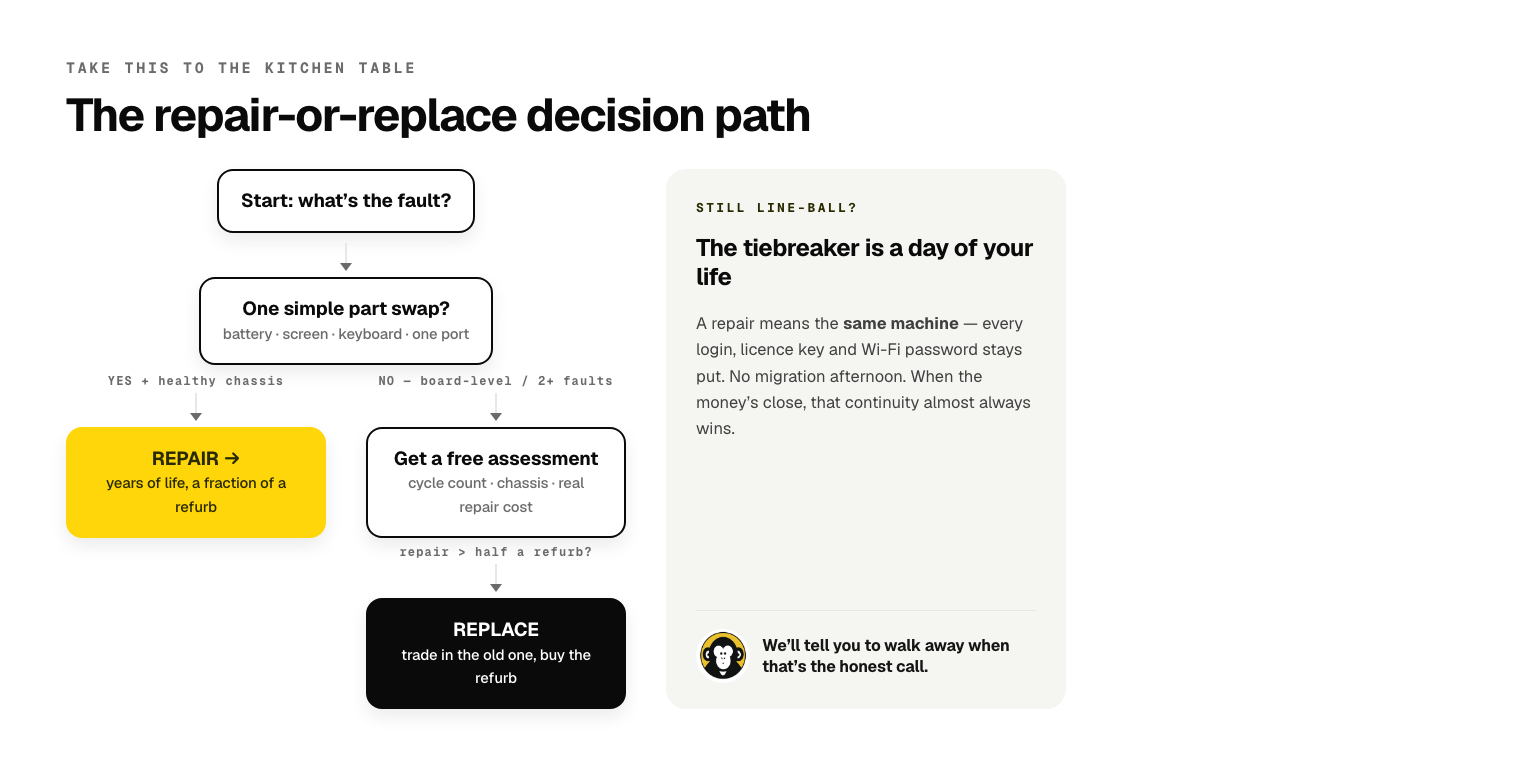
- Is the fault a single, simple part swap? (battery, screen, keyboard, one port) — If yes and the machine is otherwise healthy, repair. You're buying years of life for a fraction of a refurb.
- Is it board-level, or are there two-plus faults at once? — Get an honest assessment first. If the repair is more than about half the cost of a comparable refurb, lean replace.
- What's the battery cycle count and chassis condition? — Low cycles and a clean chassis push toward repair. High cycles plus hinge/port wear push toward replace.
- What does a comparable refurb actually cost? (not a new machine — a refurb) — If the refurb is close to the repair cost, factor in the machine upgrade and the trade-in value of your old one.
- How much is a day of setup worth to you? — If repair and replace are line-ball on money, the "I don't touch anything" continuity of a repair is usually the tiebreaker.
None of this needs you to guess. Bring the machine in, we'll pull the cycle count and check the chassis for free, tell you what the repair actually involves, and give you a straight answer — including "don't bother, here's what I'd buy instead." That honesty is the whole reason people come back to us 13 years later, and bring their partner's laptop in too.
Build a quote in 60 seconds if you already know the fault, or just walk in to DFO Uni Hill any day between 10 and 6 and we'll take a look.
03 9467 9694 · K10, DFO Uni Hill, 2 Janefield Drive, Bundoora · open every day, 10:00am – 6:00pm


Be the first to comment — or if you'd rather just ask us in person, walk in to DFO Uni Hill any day 10–6.